Author: Tele UK

  • Every Calculator You Need in One Place

    Every Calculator You Need in One Place

    A Look at Repurpi’s Free Online Calculator Hub

    Finding a reliable calculator online often means wading through cluttered websites, intrusive ads, and tools that only do one narrow job. Repurpi’s Every Calculator hub solves that problem by bringing together more than 30 free, fast, and mobile-friendly calculators in a single, well-organized location. Whether you’re figuring out a discount at checkout, calculating your exact age, working out VAT on an invoice, or measuring the return on a business investment, Repurpi’s calculator suite is designed to give you accurate answers in seconds — no sign-up, no paywall, and no unnecessary friction.

    What Is Repurpi’s Calculator Hub?

    Repurpi is a broader tool platform that also offers products like an AI label remover, an image-to-prompt converter, a social media prompt generator, a file converter, and a content studio. Nested within this ecosystem is the calculators section, a dedicated resource built specifically for everyday numerical tasks. The page is structured around five core categories — Math, Date & Time, Finance, Business, and Conversions — each housing a set of purpose-built calculators that solve common, real-world problems.

    The hub is clearly built with usability and search intent in mind. Rather than forcing users to dig through menus, the homepage highlights the most popular calculators right up front, while a full categorized directory sits just below for anyone who needs something more specific. This structure makes it easy for both new visitors and returning users to find exactly what they’re looking for, whether they arrived through a search for “percentage calculator” or are browsing to see what other free tools are available.

    Popular Calculators at a Glance

    Repurpi showcases eight standout tools on its main calculators page, each addressing a task that a huge number of people search for on a daily basis:

    • Percentage Calculator – A quick way to calculate percentages for shopping, grading, statistics, or everyday math problems without pulling out a formula sheet.
    • Age Calculator – Instantly find your exact age (or someone else’s) down to the year, month, and day, based on a date of birth.
    • VAT Calculator – Add or remove Value Added Tax from any amount, a must-have for freelancers, small business owners, and online shoppers dealing with international pricing.
    • Discount Calculator – Work out the final price after a discount and see exactly how much money you’re saving on a sale item.
    • ROI Calculator – Calculate return on investment as a percentage, useful for marketers, investors, and business owners evaluating the profitability of a campaign or purchase.
    • Compound Interest Calculator – Project how savings or investments grow over time when interest compounds, a key tool for financial planning.
    • Loan Calculator – Estimate monthly loan payments and total interest owed, helping borrowers understand the true cost of financing before signing anything.
    • Temperature Converter – Convert quickly between Celsius, Fahrenheit, and Kelvin for cooking, travel, science, or weather-related needs.

    Each calculator link leads to a dedicated, single-purpose page, which keeps the tools fast-loading and focused rather than bloated with unrelated content.

    Browsing by Category

    For users who need something beyond the popular picks, Repurpi organizes its full library into five clear categories:

    Math covers free calculators for percentages, ratios, averages, and other foundational calculations that students, teachers, and everyday users rely on constantly.

    Date & Time is built around calculating ages, counting days between two dates, figuring out working days for project planning, and measuring time durations — all common tasks for HR professionals, project managers, and anyone planning an event or deadline.

    Finance is one of the most robust categories, offering VAT, discount, ROI, interest, loan, and profit margin calculators. This makes it a genuinely useful resource for personal finance decisions as well as small business bookkeeping, giving users a single destination for a wide range of money-related math.

    Business rounds out the commercial side with tools for break-even analysis, conversion rate, CPM, CPC, CTR, and ROAS calculations — metrics that digital marketers, e-commerce managers, and advertisers check regularly when evaluating campaign performance and profitability.

    Conversions handles the practical, everyday need to convert between units of length, weight, temperature, area, volume, and speed, useful for cooking, DIY projects, travel, fitness tracking, and international collaboration where measurement systems differ.

    This category-first structure means the hub isn’t just a random collection of tools — it’s a genuinely thought-out resource that anticipates the kinds of calculations people search for in clusters, whether that’s a student working through a math assignment or a small business owner juggling pricing, tax, and marketing metrics in the same afternoon.

    Why a Calculator Hub Like This Matters

    Standalone calculator websites often specialize in just one function, forcing users to bookmark multiple sites or repeatedly search for a new tool every time their needs shift slightly. Repurpi’s approach — consolidating dozens of calculators under one roof with consistent design and easy category navigation — removes that friction. It also means the tools share a similar interface and experience, so once you’re comfortable using one calculator, the rest feel intuitive immediately.

    This kind of hub also benefits from being part of a larger platform. Repurpi’s calculators sit alongside other productivity-focused tools like its file converter and content studio, suggesting the company is building a broader suite of practical, no-cost utilities aimed at freelancers, small business owners, marketers, students, and everyday consumers who need quick, accurate answers without unnecessary complexity.

    Who Should Use Repurpi’s Calculators?

    The breadth of categories makes this hub genuinely useful across a wide range of audiences:

    • Students and educators benefit from the math and date/time calculators for coursework, grading, and scheduling.
    • Small business owners and freelancers can rely on the finance and business calculators for invoicing, tax calculations, loan planning, and marketing performance tracking.
    • Digital marketers and advertisers will find the CPM, CPC, CTR, and ROAS calculators particularly relevant for evaluating ad spend efficiency.
    • Everyday consumers can use the discount, VAT, and conversion calculators for shopping, travel, and daily life tasks.
    • Anyone tracking personal finances can take advantage of the compound interest and loan calculators to plan savings goals or understand borrowing costs before committing.

    Final Thoughts

    Repurpi’s Every Calculator hub is a well-organized, genuinely practical resource for anyone who regularly needs quick, reliable answers to numerical questions. By grouping over 30 calculators into five clear categories — Math, Date & Time, Finance, Business, and Conversions – and highlighting the most commonly needed tools on its homepage, Repurpi has created a one-stop destination that saves users time and eliminates the need to search separately for each individual calculation. Whether you’re a student, a small business owner, a marketer, or simply someone trying to work out a discount or convert a temperature, this free, ad-light, mobile-friendly hub is worth bookmarking for everyday use.

  • Image to Prompt: Turn Any Image Into an AI Prompt

    Image to Prompt: Turn Any Image Into an AI Prompt

    Have you ever found an image you love and wondered how to recreate its style with AI?

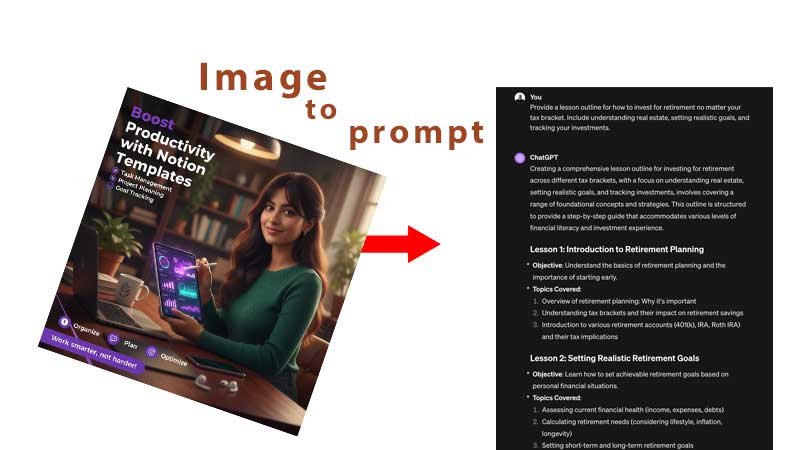
    An image to prompt tool can help. Instead of starting with a blank text box and trying to describe an image yourself, AI analyses the visual information in an image and converts it into a detailed, reusable prompt.

    With Repurpi’s Image to Prompt tool, you can upload a reference image and generate prompts based on its subject, composition, lighting, colour, mood, style and other visual characteristics. The result can then be adapted for popular AI image generators including ChatGPT, Midjourney, Flux, Stable Diffusion, Gemini and Ideogram.

    What Is an Image to Prompt Generator?

    An image to prompt generator is an AI-powered tool that analyses an image and transforms its visual characteristics into written instructions for an AI image generator.

    Traditional AI image generation works like this:

    Text prompt → AI → Image

    Image-to-prompt technology works in the opposite direction:

    Image → AI analysis → Prompt

    The generated prompt can describe elements such as the main subject, composition, lighting, colour palette, camera characteristics, artistic style, atmosphere, textures and typography.

    This makes image-to-prompt tools particularly useful when you have a visual reference but don’t know how to describe it using the terminology that AI image generators understand.

    How Does Image to Prompt Work?

    Repurpi’s workflow is designed around three main stages: upload, analyse and generate.

    1. Upload an Image

    Start by uploading a reference image. Repurpi supports common formats including JPG, PNG, WEBP, GIF and BMP, with images up to 10 MB.

    Your image could be a photograph, digital artwork, product image, advertisement, character design, poster, social media graphic or another visual reference.

    2. Analyse the Image

    The AI examines the visual information in the image and extracts important characteristics.

    Repurpi’s analysis includes elements such as:

    • Subject
    • Composition
    • Camera
    • Lighting
    • Colour
    • Style
    • Mood
    • Texture
    • Typography

    These elements are combined into a canonical visual specification that can then be converted into different prompt formats.

    3. Generate and Edit Your Prompt

    The resulting prompt can be copied, downloaded or edited. This gives you a starting point that you can refine rather than having to write a detailed prompt from scratch.

    Repurpi also supports structured outputs such as JSON, JS, YAML, Markdown and XML, which can be useful for developers and people building AI-powered workflows.

    What Can You Do With an Image to Prompt Tool?

    The biggest advantage of an image-to-prompt generator is that it turns a visual reference into something you can work with.

    Create a Similar Image

    If you have a reference image with an interesting composition, lighting setup or visual style, you can use the generated prompt as the foundation for creating an original image.

    Repurpi’s Create a Similar Image option is designed to preserve important visual characteristics such as composition, lighting, style and mood while allowing you to create an original result.

    Create an Original Variation

    Sometimes you don’t want to reproduce the exact subject. You may simply like the overall visual direction.

    The Original Variation option focuses on the image’s visual DNA, including elements such as colour harmony, composition and mood, while reducing emphasis on exact subject details.

    This can be particularly useful for designers, marketers and content creators looking for new creative directions.

    Analyse an Image in Detail

    Image-to-prompt technology can also be used as a learning tool.

    Repurpi’s Deep Analysis mode provides a technical breakdown of observable visual attributes. This can help you understand why an image looks the way it does and which elements contribute to its overall appearance.

    Remix or Edit an Image Concept

    Another useful application is image remixing.

    You can analyse an existing image and then generate instructions for changing elements such as the subject, background, lighting or visual style.

    For example, a product photographer could analyse an existing product scene and then create a variation with a different background or lighting direction.

    Image to Prompt for Midjourney, ChatGPT, Flux and More

    One challenge with AI image generation is that different models can respond differently to prompts.

    A generic description may not be the best format for every model.

    Repurpi lets you select the target platform and generates different prompt styles for:

    • ChatGPT / DALL·E
    • Gemini / Imagen
    • Midjourney
    • Flux
    • Stable Diffusion
    • Ideogram
    • Generic / Universal

    For example, Midjourney prompts can use its parameter syntax, while Stable Diffusion can use comma-separated tags and weights. ChatGPT and Gemini can use more natural-language descriptions.

    This model-specific approach can save time when moving a visual idea between different AI platforms.

    Can AI Recover the Original Prompt From an Image?

    Not necessarily.

    An important distinction is that an image-to-prompt generator does not normally recover the exact original prompt that created an image.

    Many different prompts can produce visually similar results. The AI therefore analyses the visible evidence in the image and creates a new prompt designed to describe or reproduce those characteristics.

    This is better understood as reverse engineering a useful prompt, rather than discovering the original creator’s exact wording. Other image-to-prompt services make the same distinction between reconstructing a useful prompt and recovering hidden original wording.

    Who Should Use an Image to Prompt Generator?

    Image-to-prompt tools can be useful for a wide range of users.

    AI artists can analyse reference images and develop new prompts.

    Graphic designers can study composition, colour and visual style.

    Content creators can turn visual inspiration into repeatable AI workflows.

    Marketers can experiment with different creative concepts and advertising imagery.

    Photographers can analyse lighting, composition and camera characteristics.

    Developers can use structured formats such as JSON, JS or YAML to incorporate image analysis into automated workflows.

    Is Repurpi Image to Prompt Free?

    Repurpi provides an image-to-prompt interface where you can upload an image and select the type of analysis and target AI model you want to use. The page states that uploaded images are analysed on the server and not stored, while generated prompts can be copied for use elsewhere.

    For anyone working with private or commercially sensitive images, it is still sensible to review the current privacy and processing information before uploading confidential material.

    Why Use Image to Prompt Instead of Writing a Prompt From Scratch?

    Writing a detailed AI image prompt manually can take considerable time, particularly when you need to describe lighting, composition, colour, camera characteristics and artistic style.

    An image-to-prompt generator gives you a visual starting point.

    Instead of asking:

    “How do I describe this image?”

    you can ask:

    “What visual characteristics should my AI prompt contain?”

    That shift makes the creative process faster and gives you an editable foundation that you can refine.

    Try Image to Prompt With Repurpi

    If you have an image that inspires you, you don’t have to spend hours trying to describe it.

    Repurpi Image to Prompt lets you upload a reference image, analyse its visual characteristics and generate reusable prompts for different AI image-generation platforms.

    Whether you want to create a similar image, develop an original variation, understand an image’s visual structure or build a repeatable AI workflow, image-to-prompt technology provides a practical bridge between visual inspiration and text-based AI creation.

    Upload an image, analyse its visual DNA, generate your prompt, and start creating.

  • Simple Way to Turn One Piece of Content Into Multiple Social Posts

    Simple Way to Turn One Piece of Content Into Multiple Social Posts

    Repurpi ContentStudio: A Simple Way to Turn One Piece of Content Into Multiple Social Posts

    Creating good content is only half the challenge for modern creators, marketers and business owners. The other challenge is getting that content in front of people across the platforms they actually use.

    A detailed blog post might perform well on a website, for example, but that same piece of content needs a different structure if it is going to work on LinkedIn, Instagram or X. A podcast transcript has useful ideas inside it, but turning those ideas into several social posts can take almost as much time as creating the original content.

    This is where Repurpi ContentStudio comes in. Its Repurpose tool is designed around a straightforward idea: take one piece of long-form content and turn it into several platform-ready formats.

    Rather than presenting itself as a complicated content marketing platform with dozens of features, Repurpi takes a more focused approach. The company’s wider philosophy is based on building individual tools that solve specific problems without unnecessary feature bloat.

    What Is Repurpi ContentStudio?

    Repurpi’s ContentStudio is a content creation workspace aimed at creators and businesses that already have material but want to get more value from it.

    The Repurpose section asks users to paste long-form content. The tool specifically identifies possible inputs such as blog posts, transcripts, essays, scripts and notes. From that source material, it produces four different outputs designed for different social platforms.

    Those four outputs are:

    • An X/Twitter thread
    • A LinkedIn post
    • An Instagram caption
    • A short-form video hook

    This is an important distinction. Repurpi is not simply asking users to copy and paste the same article onto different platforms. The purpose is to transform the original idea into formats that make more sense for each channel.

    For a creator who has spent several hours producing a substantial article, podcast or video script, this can significantly reduce the amount of manual work involved in distributing that content.

    How the Repurpose Tool Works

    The workflow is deliberately simple.

    First, the user supplies their original content. Repurpi then processes that material and generates the four derivative formats.

    The page itself demonstrates the process using a sample article about productivity. The sample discusses eliminating unnecessary meetings and protecting high-value work. Repurpi uses that source material as the basis for its platform-specific content outputs.

    The simplicity is one of the tool’s strongest characteristics. There is no indication that users need to build complex automation workflows before they can experiment with the feature. The page provides a sample and a “Repurpose” action, making it possible to understand the basic concept almost immediately.

    This reflects the broader Repurpi philosophy: its homepage describes the products as focused tools designed to solve individual problems, with an emphasis on being ready to use rather than overwhelming users with unnecessary functionality.

    Why Content Repurposing Matters

    The underlying concept behind Repurpi is not new. Content repurposing has become an important part of modern content marketing because creating completely original material for every platform is inefficient.

    A single long-form article can contain dozens of smaller ideas. Those ideas can become social posts, discussion points, video hooks, email content and other formats.

    The advantage is not simply saving time. Repurposing can also extend the lifespan and reach of the original content.

    For example, imagine a company publishes a 2,000-word article about improving productivity. The website article might attract search traffic, while individual insights from the article could become LinkedIn content. A provocative statement could become an X thread, while one of the strongest ideas could become the opening hook for a short-form video.

    The original research and thinking only have to happen once. The distribution can then be adapted for different audiences.

    That is the fundamental problem Repurpi is attempting to solve.

    The Role of the Brand Profile

    One particularly interesting part of ContentStudio is its Brand Profile functionality.

    The Repurpose page invites users to set up a Brand Profile, while the dedicated onboarding page describes this as a one-time setup intended to make subsequent generations sound more like the user’s brand.

    The setup begins by asking for information such as a profile name and the niche or audience the content is intended for.

    This is potentially important because generic AI-generated content often has a recognisable problem: it can sound polished but interchangeable.

    For businesses and creators, consistency of voice matters. A LinkedIn post for a technology company should not necessarily sound like a personal creator’s Instagram caption, even when both are discussing the same subject.

    A brand profile gives Repurpi a mechanism for making its outputs more context-aware rather than treating every generation as an isolated prompt.

    Where Repurpi Fits Into the AI Content Market

    Repurpi is entering a crowded market. There are already numerous AI tools that can generate social posts, rewrite articles and create marketing copy.

    Its differentiation appears to be simplicity.

    The wider Repurpi website describes ContentStudio as “the content workspace for creators who ship” and groups several focused capabilities under it, including Repurpose, Voice Check, Script Generator and Caption from Image.

    This gives the product a relatively clear identity. Instead of trying to become an enormous AI marketing platform, Repurpi is assembling smaller tools around practical content-production tasks.

    That approach can be attractive to users who do not want to spend time configuring an elaborate system just to turn an article into social media content.

    Who Would Benefit Most From It?

    Repurpi’s Repurpose tool is particularly relevant to several types of users.

    Solo creators can use it to extract multiple social posts from content they have already produced.

    Consultants and coaches can turn articles, transcripts and notes into regular social content without manually rewriting every idea.

    Small businesses can use existing thought leadership, website content or scripts to maintain a more consistent social presence.

    Marketing teams could potentially use the tool as an initial drafting layer, giving writers a collection of platform-specific starting points rather than asking them to create every post from scratch.

    The biggest benefit is likely to be for people who already create long-form content. If someone has no source material, a repurposing tool has less value because there is nothing substantial to transform.

    Strengths and Limitations

    The biggest strength of Repurpi’s approach is its clarity. The user understands the proposition immediately: paste content and receive four different formats. The tool also provides a demo mode without requiring an API key, which lowers the barrier to trying the concept.

    The main limitation is also clear from the same design. Four formats will not necessarily cover every content strategy.

    A business might need email newsletters, Facebook posts, Pinterest content, YouTube descriptions, carousel scripts or detailed video scripts. Repurpi’s Repurpose tool is deliberately narrower.

    That is not necessarily a weakness—it is a trade-off. The product is prioritising a small number of useful outputs rather than attempting to automate every aspect of content marketing.

    Users should also remember that AI-generated repurposing still requires editorial judgement. A good source article does not automatically produce a great social post. Platform conventions, audience expectations, brand voice and factual accuracy still need human oversight.

    Final Verdict

    Repurpi ContentStudio’s Repurpose tool takes a practical approach to one of the biggest problems in modern content marketing: creating enough platform-specific content without constantly starting from zero.

    Its core workflow is simple. Give the system a blog post, transcript, essay, script or notes, and it generates four different formats: an X/Twitter thread, LinkedIn post, Instagram caption and short-form video hook.

    The Brand Profile feature adds another useful layer by allowing users to establish their identity and audience so that future generations can be more consistent with their brand.

    Ultimately, Repurpi is not trying to replace a complete content marketing team. Its value is more specific: it helps turn one substantial piece of thinking into several pieces of usable distribution content.

    For creators, consultants, founders and small marketing teams, that can be a meaningful productivity improvement. Instead of asking, “What should I post today?”, the better question becomes, “What have I already created that I can get more value from?”

    That shift—from creating more content to getting more mileage from existing content—is exactly where Repurpi ContentStudio makes the most sense.