 Working with different image and document formats is a normal part of everyday life. Whether you are preparing images for a website, reducing the size of photos for faster loading, creating a PDF from several pictures, or converting a modern WebP image into a more widely supported format, having the right file conversion tool can save time.
Repurpi File Converter provides a collection of free online tools for converting, compressing and resizing images and PDFs directly in your web browser. The platform is designed to make file conversion simple, fast and privacy-conscious, without requiring complicated software or downloads.
What Is an Online File Converter?
An online file converter is a browser-based tool that changes a file from one format into another. Instead of downloading dedicated software, installing plugins or learning complicated editing programs, you can upload a file, choose your desired output and download the converted version.
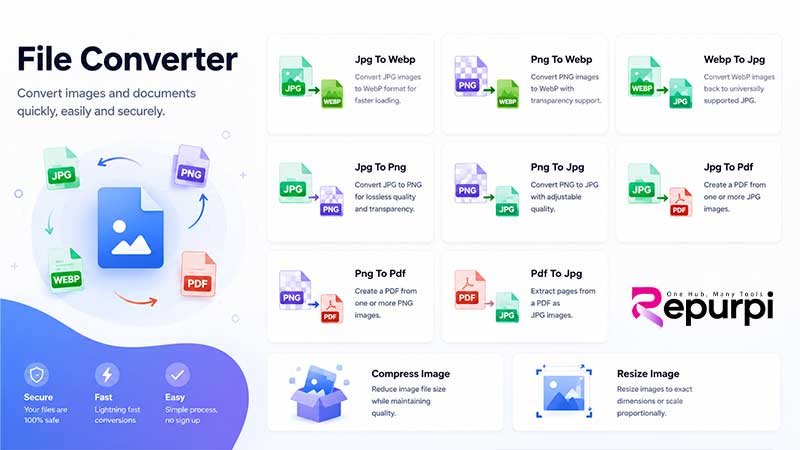
Repurpi’s File Converter Hub brings several commonly needed conversion tools together in one place. The platform currently offers 10 tools covering JPG, PNG, WebP and PDF files, along with image compression and resizing.
This makes it useful for website owners, content creators, students, businesses, designers and anyone who regularly works with digital files.
JPG to WebP Converter
WebP is a modern image format designed to provide efficient compression while maintaining good visual quality. Converting JPG images to WebP can be particularly useful when preparing images for websites.
Repurpi’s JPG to WebP converter allows users to convert JPG images into WebP format for faster-loading web content.
Smaller image files can help reduce page weight, which is important for website performance and user experience. If you manage a blog, online store or business website, converting suitable JPG images to WebP can be a useful part of an image optimisation workflow.
PNG to WebP Conversion
PNG is popular because it supports transparency and is widely used for graphics, logos and images requiring a transparent background. However, PNG files can sometimes be larger than necessary.
The PNG to WebP converter on Repurpi provides a way to convert PNG images to WebP while supporting transparency. This can be useful when you want the advantages of a modern web-friendly format without automatically losing transparent backgrounds.
WebP to JPG Converter
Although WebP is increasingly common online, there are still situations where JPG is more convenient or compatible with existing software and workflows.
Repurpi’s WebP to JPG converter converts WebP images back into JPG format, making them easier to use with applications, websites or systems that expect a traditional JPG image.
This can be especially useful when downloading images from websites and preparing them for software that does not work well with WebP.
Convert JPG to PNG
The JPG to PNG converter is useful when you need a PNG version of an image. PNG is a popular choice when you need lossless image storage or want to work with transparency as part of a broader editing workflow.
Converting an image to PNG can be helpful for graphics, digital assets and other situations where PNG is the preferred format.
Convert PNG to JPG
If you have PNG images that are unnecessarily large for your intended use, converting them to JPG can provide a smaller file suitable for many photographs and web applications.
Repurpi’s PNG to JPG converter includes adjustable quality, allowing users to control the balance between image quality and file size. This makes it useful when you need to reduce file sizes while retaining an acceptable visual result.
Convert JPG Images to PDF
Sometimes images need to be packaged into a document rather than kept as individual image files. Repurpi provides a JPG to PDF converter that can create a PDF from one or more JPG images.
This can be useful for creating simple photo documents, combining scanned pages, preparing documents for sharing or turning a collection of images into a single downloadable file.
Convert PNG to PDF
The PNG to PDF converter provides similar functionality for PNG images. Instead of sharing multiple PNG files individually, you can combine them into a PDF document.
This can be particularly convenient for scanned graphics, screenshots, illustrations and other PNG-based documents.
PDF to JPG Converter
The reverse process is also available. Repurpi’s PDF to JPG converter allows users to extract pages from a PDF as JPG images.
This can be useful when you need to use an individual PDF page as an image, publish a page online, create a thumbnail or work with PDF content in an image-based application.
Compress Images Online
Large images can consume storage space and increase website loading times. Image compression can reduce file size while aiming to preserve useful visual quality.
Repurpi includes a dedicated Compress Image tool designed to reduce image file size while maintaining quality.
Image compression can be especially useful before uploading pictures to websites, sending files by email or storing large collections of images.
Resize Images to Exact Dimensions
Sometimes changing the file format is not enough. You may also need an image to meet specific width and height requirements.
Repurpi’s Resize Image tool allows users to resize images to exact dimensions or scale them proportionally. This makes it useful for website graphics, social media images, thumbnails, documents and other digital content.
Privacy-Focused File Conversion
One of the notable features of Repurpi’s File Converter is its approach to privacy.
The platform states that conversions run directly in the user’s browser and that files do not leave the user’s device. According to the site’s FAQ, files are not uploaded to Repurpi’s servers, stored or shared with third parties.
For people working with private photographs, business graphics or other sensitive files, browser-based processing can provide an additional level of reassurance compared with services that require files to be uploaded to a remote server.
No Software Installation Required
Another advantage of using a browser-based file converter is convenience. There is no need to install desktop software, download plugins or configure complicated applications.
Repurpi allows users to choose a tool, upload a file, adjust available settings and download the result. Basic conversions do not require registration.
Guest users can process files up to 25MB per file, while free accounts receive higher limits, including support for files up to 50MB and batch processing. Paid upgrades can support files up to 200MB with batch processing.
How to Convert a File with Repurpi
Using the File Converter Hub is straightforward:
- Choose a conversion tool – Select JPG to WebP, PNG to JPG, PDF to JPG, image compression, resizing or another available tool.
- Upload your file – Drag and drop the file into the converter or select it from your device.
- Adjust settings – Depending on the tool, you can control quality, format or image dimensions.
- Download the result – Once processing is complete, download the converted file.
The entire process is designed to be quick and accessible without specialist software.
A Simple Solution for Everyday File Conversion
Whether you need to convert an image for a website, compress a large photograph, resize an image or turn several pictures into a PDF, having a collection of dedicated tools can make the process much easier.
Repurpi’s File Converter Hub brings these functions together in a single browser-based service. With support for JPG, PNG, WebP and PDF, plus image compression and resizing, it covers many of the most common file-management tasks.
For users looking for a free online file converter that is simple to use, requires no software installation and offers browser-based processing, Repurpi provides a convenient option for everyday image and PDF conversion.